HELP · HOW-TO

Need a hand? You're in the right place.

Everything you need to book a court, get in after hours, hire gear and make the most of The Park. Short videos for the visual learners, written steps for the rest.

STEP ONE · GET THE APP

Padel Park NZ — on iPhone.

The fastest way to book, pay, and find players. Free to download from the App Store.

PP
Padel Park NZ
Sports
Designed for iPhone
Download on the App Store →
[ Designer: upload the App Store screenshot here and link the App Store URL ]
No iPhone? You can do everything from a web browser instead: padelpark-nzl.matchpoint.com.es/Login.aspx — same login, same bookings, same Open Matches.
BOOKING A COURT

When you know who you're playing with.

Pick a time, lock the court, invite your crew (or pay for the whole court yourself).

Video coming soon
How to book a court — App
Video coming soon
How to book a court — Web

What's a court booking?

A standard booking. You pick the time, sport and duration. Once you've paid the down payment, the court is yours.

You can invite friends to the booking — each gets the option to pay their share — or just cover the whole court yourself.

Heads-up on cancellation

Members: cancel up to 6 hours before start for a full refund.

Non-members: cancel up to 12 hours before start for a full refund.

Inside those windows we can't refund automatically — message us on WhatsApp if something genuine has come up.

OPEN MATCHES

When you know when — but not who.

Open Matches let you create a 4-player slot (2 vs 2, best of 3 sets) and either share it privately with your group, or open it to anyone at your level.

PUBLIC OPEN MATCH

Anyone matching your filters can join.

You set the level range, gender (male / female / mixed), and whether it's competitive (ranking on) or social. The system notifies eligible players and they jump in.

Best for: finding new players, meeting the club, filling a court when your usual crew can't make it.

PRIVATE OPEN MATCH

Only people with the link can join.

Same booking flow, but the match isn't broadcast to the wider club. You get a shareable link to drop into WhatsApp, a group chat, or send to a few specific players.

Best for: your regular crew, work groups, friend groups — anyone you want to invite directly and have pay their share.

Video coming soon
Public Open Match — App + Web
Video coming soon
Private Open Match — App + Web
CANCEL OR PAY

Sorting out a booking after you've made it.

Cancel, pay an outstanding amount, or work out why a payment didn't go through.

Video coming soon
Cancel or pay a booking — App + Web

Cancellation windows

Members: full refund up to 6 hours before your booking starts.
Non-members: full refund up to 12 hours before start.
Inside the window? We can't refund automatically. Send us a WhatsApp if something genuine has come up — we'll do what we can.

How payment works

Card on file is the smoothest. Add one in your profile and bookings & auto-charges just work.
AMEX is fine. Apple Pay and Google Pay aren't supported — sorry.
Reserving a court (with a down payment). If the payment doesn't go through, the booking isn't made. Try again or use a different card.
Outstanding amount on an existing booking. The system will auto-charge your saved card. If it fails (or you don't have a card on file) we'll send you a notification.
Unpaid after a week? The court booker is charged the outstanding amount. Full details in our T&Cs.
Stuck on a payment? Quickest fix: WhatsApp us on +64 28 407 8645 with your booking date/time and we'll sort it.
PLAYER LEVEL

Better matches start with an honest level.

Padel Park uses a 1.0–7.0 levelling system to match you against players of similar ability. Choose your starting level honestly — the system will adjust it over time based on your match results.

1.0 – 2.5
Beginner

New to the sport. Learning rules, scoring and positioning. Rallying a few balls with a cooperative partner. Confident enough to come along and have fun.

3.0 – 4.5
Intermediate

Structured rallies with intent. Solid serve, controlled volleys, growing wall game. Holding the net more often than not. Can finish when the ball sits up.

5.0 – 7.0
Advanced

Tactical rallies, strong shot variety (bandeja, vibora), confident defence under pressure. Levels 5.0+ are assigned internally by Padel Park.

Video coming soon
Set or update your level — App + Web

Update your level — Web

  1. Log in at padelpark-nzl.matchpoint.com.es
  2. Go to My Account
  3. Select My Personal Information / My Profile
  4. Scroll to Player Rating
  5. Click Edit to update your level

Update your level — App

  1. Open the Padel Park NZ app
  2. Tap Profile (bottom right)
  3. Tap Account
  4. Tap Rating
  5. Tap Edit next to the sport you want to update and select your level

Be honest. Overrating yourself leads to unbalanced matches — less fun for everyone, and slower improvement for you. The system rewards accuracy, not bravado.

Read the full Levelling Framework for the detailed level descriptions, match profile, technical ability and finishing ability at each level. Open the Padel Park Levelling Framework →
24/7 ACCESS

Open around the clock with a valid booking.

Every booking gets a personal access code that unlocks the door at the keypad. Active 15 minutes before your slot starts.

Video coming soon
How to use the 24/7 access system

Find your access code

USING THE APP
  1. Open the app
  2. Go to My Bookings
  3. Select your reservation
  4. Your Access Code is listed in the Description
NO APP?

Your access code is included in your booking confirmation and booking reminder emails. Search your inbox for "Padel Park" if you can't find it.

Getting in

1
Enter your access code on the keypad
2
Press # after the code
3
Push the door handle down as normal to enter
Things to know. The facility is under 24/7 surveillance — by entering you agree to our T&Cs and Privacy Policy. Your code is valid for your booking group only, and you're responsible for anyone you bring in. Bathrooms, changing and the warm-up space are open whenever you're there.
Code not working? Hit the doorbell or WhatsApp us on +64 28 407 8645 — we'll get you in.
HIRE A RACKET OR PADDLE

Vending machine, open 24/7.

No racket? No problem. Two vending machines on site — standard padel & pickleball hire from $4/hr, premium padel rackets from $6/hr. Or grab one from the pro shop during staffed hours.

Video coming soon
How to use the vending machines

Renting a racket / paddle

Tap RENT on the screen, then choose the racket or paddle you want.
The screen shows the price per hour. Tap ENTER, then pay (a $20 bond is held; the system refunds the unused portion within 3 working days).
Write down or photograph your Return Number — you'll need it to hand the racket back. Take the printed receipt too if available.
Tap ENTER. Your locker opens — take the racket and close the locker.

Returning

Tap RETURN on the screen.
Enter your Return Number — your locker opens.
Place the racket inside and close the locker. Done.
How charges work. The vending machine charges in 30-minute blocks starting on the hour. There's a 10-minute grace period both for taking the racket out and handing it back — you won't get stung for a couple of minutes either way.
Lost your Return Number? WhatsApp us on +64 28 407 8645 with the time of rental and we'll look it up.
FACILITY MAP

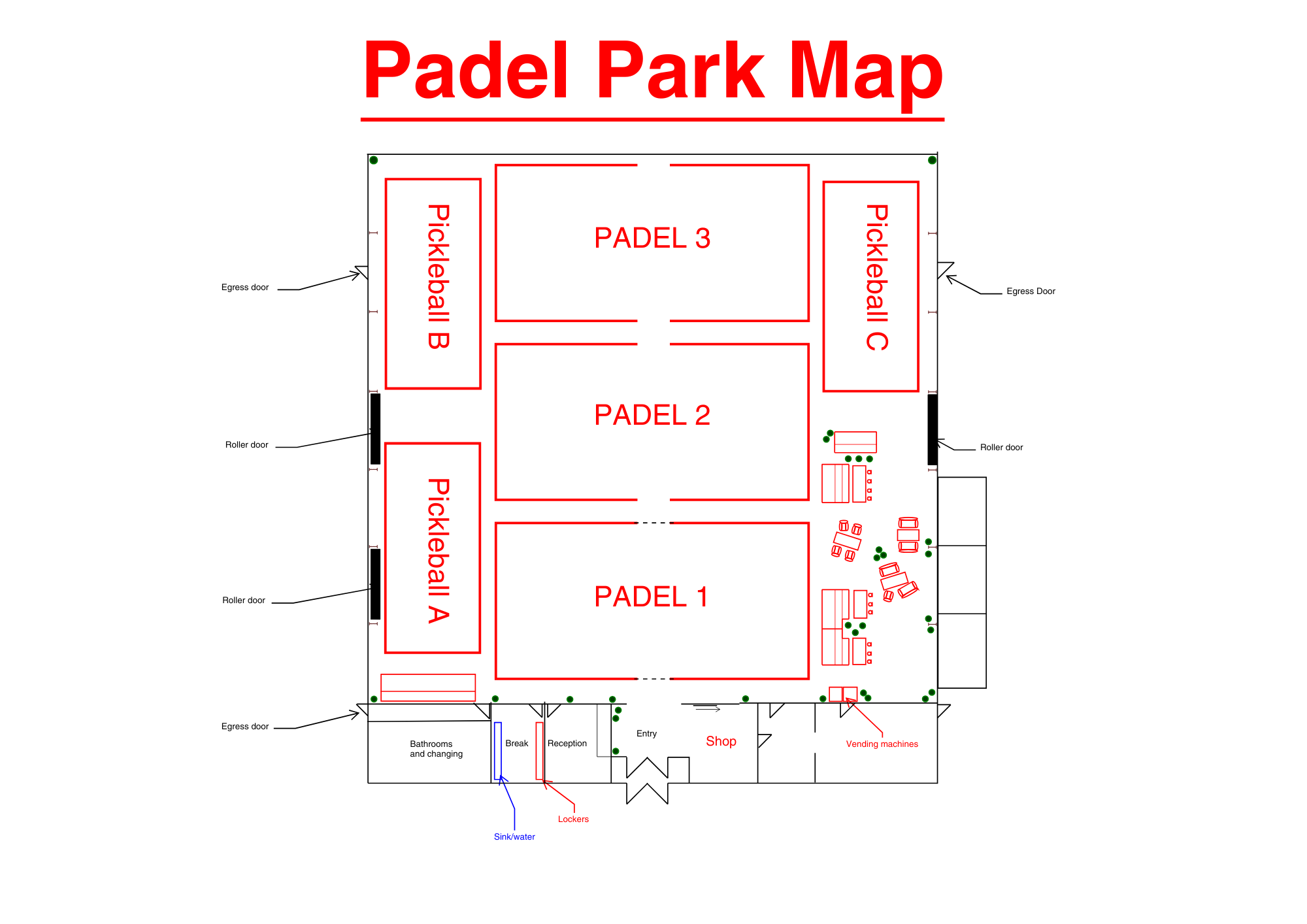
Find your court at a glance.

Three padel courts down the middle, three pickleball courts on the left. Reception, the shop and the vending machines all by the entry.
[ Designer: upload Padel Park Map image to Webflow Assets and place it here ]
FIRST TIME AT THE PARK

Show up, settle in, and play.

Parking

Free parking all around the building. Best is right in front of the main entry doors.

What to bring

Court shoes are preferred, but clean trainers are fine. Bring a water bottle — or fill up at the fountain in the locker room.

When to arrive

Your access code is active 15 minutes before your booking. During staffed hours you can turn up anytime, hang out, work, warm up — The Park is yours.

Check-in

During staffed hours, swing by reception — grab a racket rental there if you'd like, or use the vending machines. Then head to your court.

Staffed hours. 5pm–10pm on weekdays, 10am–3pm on weekends. Outside those hours The Park is still open with your access code — just a bit quieter.
Spaces to use. We've built a warm-up / stretching room, a comfy lounge, and you're welcome to use the space to work too. The Park is meant to be hung out in.
MEMBERSHIPS, PASSES & VOUCHERS

Discounts apply automatically.

Once a membership or pass is attached to your account, the booking flow auto-detects the time-of-day and applies the right discount. You don't have to remember anything at checkout.

Memberships & passes

Student, 60+, Off-Peak, Peak/Park — all auto-applied when you book a court that matches your discount window.

See current pricing on the memberships page.

The Park Membership minutes

If you have a Park Membership and want to use your free play minutes:

  1. Make your booking as normal
  2. Tap Match Pass (app and web)
  3. Select the minutes voucher

The minutes are deducted from your balance and the booking is paid.

Buying or upgrading. Memberships and passes are available on both the website and the app. The memberships page has the full lineup.
Vouchers. We run occasional promo vouchers (e.g. "buy 4 get 1 free" on 60-minute padel). The next one will be around our first-year anniversary — keep an eye on socials.
EVENTS, SOCIALS & LEAGUES

There's almost always something on.

Padel socials, pickleball socials, drop-in clinics, leagues, Club Day. All bookable in the app or on the web.

Web

  1. Go to padelpark-nzl.matchpoint.com.es
  2. Open the Make a Booking dropdown
  3. Select Weekly Events / Activities
  4. Pick your session and book

App

  1. Open the Padel Park NZ app
  2. Scroll to the bottom of the homescreen
  3. Tap Activities
  4. Choose the activity type (e.g. padel socials) — then pick the date and time
See what's coming up on the weekly events page or the Club Day tournament page.
STILL STUCK?

Talk to a human.

We're here for you. Match the channel to the urgency — we'll get back to you fast.

During opening hours, you can also hit the doorbell at the main entry. Instagram and Facebook DMs work too, but we don't check them as regularly — WhatsApp or email is faster.